So, I encountered a problem. Googling used to be much easier without additional unnecessary stuff until google introduced google AI. I have no problem with that as it can be correct but I don’t want this result as my default suggestion and it is located on the top page which is really annoying. I prefer to browse myself. Until now, only one method that avoid this google ai overview. Essentially this method that I’m going to tell you require input on the internet browser’s url box, then google then instead of google via “all”, your search basically goes through google “web” tab. On this tab, AI overview won’t be shown. I’d like to thank the guys behind this (TenBlueLinks.org)
I’m showing you how to get this in Firefox (MacOS)
Visit TenBlueLinks.org in Firefox
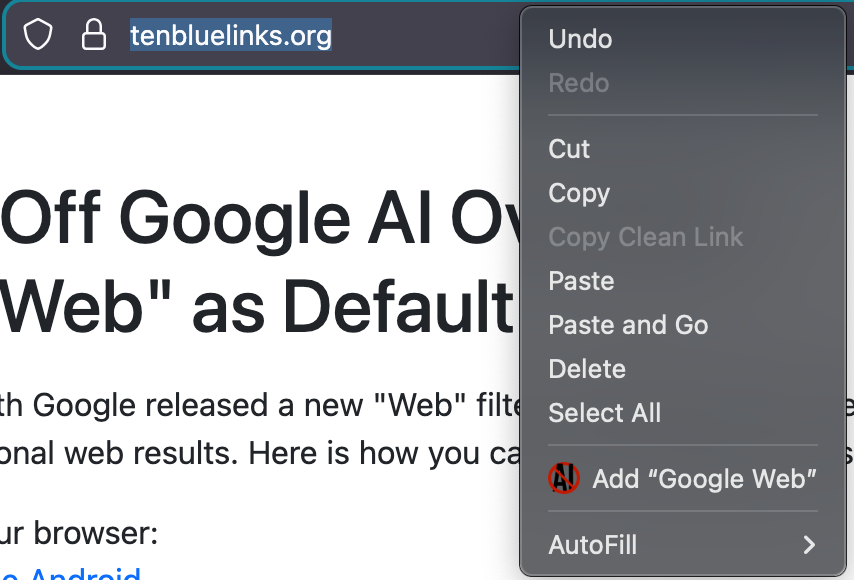
Right-click on the address bar and select the Add Google Web as shown in the figure below
Copy and paste this link about:preferences#search on the address bar or go to Settings then “Search”
Under the “Default Search Engine” section select “Google Web” the one you’ve just added
Done, but now this means however, you need to use google on the address bar, not on the google unfortunatelly. so just create a new tab then search the thing that you’re looking for
More information for other browsers can be found on TenBlueLinks.org website